
AI-generated 3D models can get you from a blank scene to a recognizable prop, building, or creature quickly. They can also arrive with dense topology, fragmented materials, oversized textures, unnamed nodes, or geometry that looks harmless in a turntable but becomes expensive when repeated across a game level.
Optimization is therefore not one button at the end of production. It is a sequence: define what the asset must do, measure it in a representative scene, remove waste, simplify what the camera cannot reward, compress the delivery files, and test again on real devices.
The goal is not the smallest possible file. The goal is a dependable asset that loads fast enough, renders within the scene budget, remains easy to debug, and still communicates the intended silhouette and material language.
Quick read
Key takeaways
- Set an asset budget in the context of the complete scene, not from a polygon count viewed in isolation.
- Fix duplicate geometry, hidden surfaces, excessive materials, transforms, and texture waste before applying compression.
- Geometry compression reduces transfer size, but it does not remove the runtime cost of drawing overly complex meshes.
- Keep an editable source model and export a separate delivery GLB that can be validated, measured, and replaced safely.
Define Browser-Ready Before You Optimize
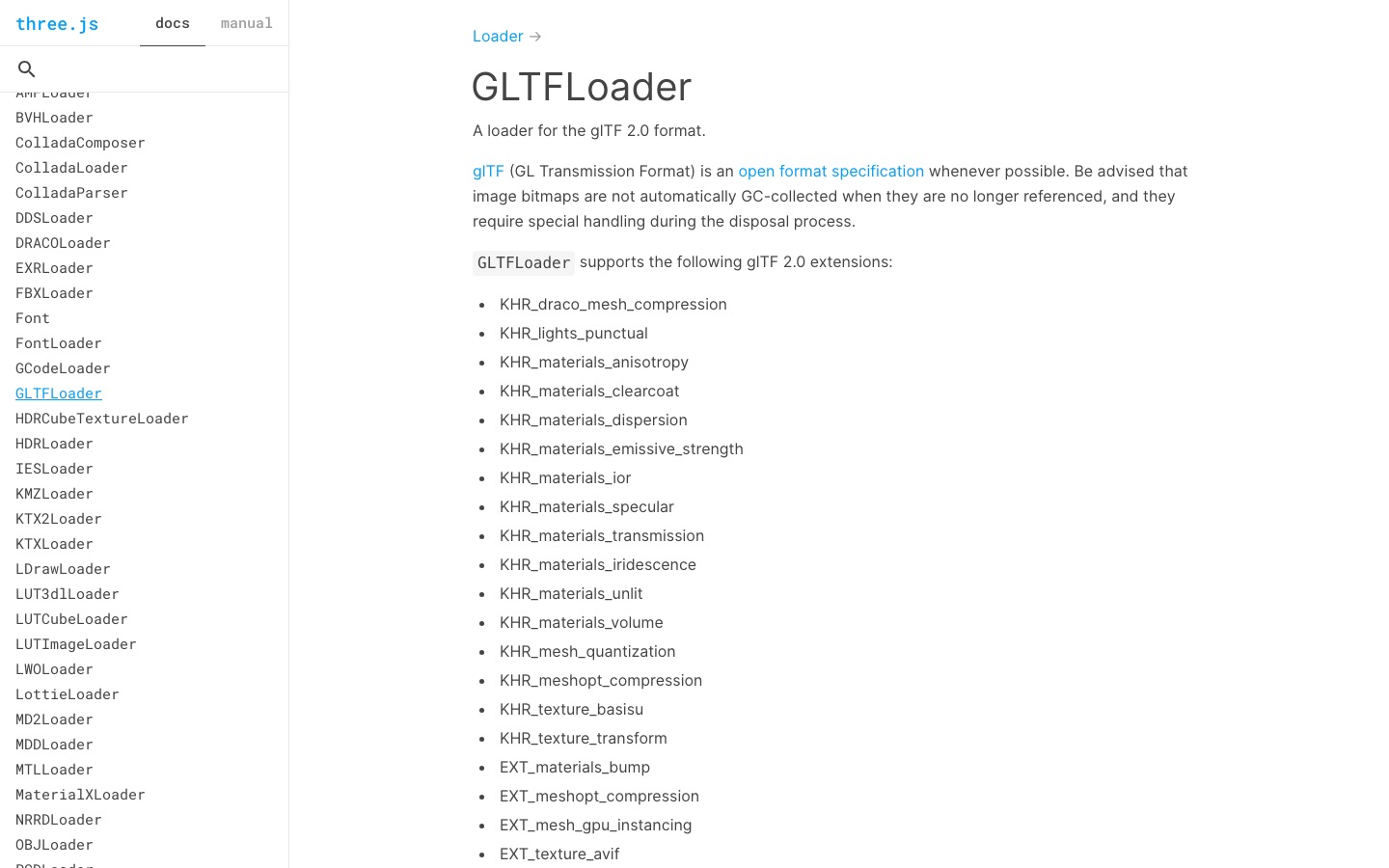
Start with the asset's job. A hero character seen close to the camera needs different geometry and texture treatment from a background rock repeated fifty times. A static landmark can tolerate a more complex silhouette than a skinned enemy whose vertices must be transformed every frame. Verify the implementation detail against the current Three.js GLTFLoader documentation before locking the production rule.
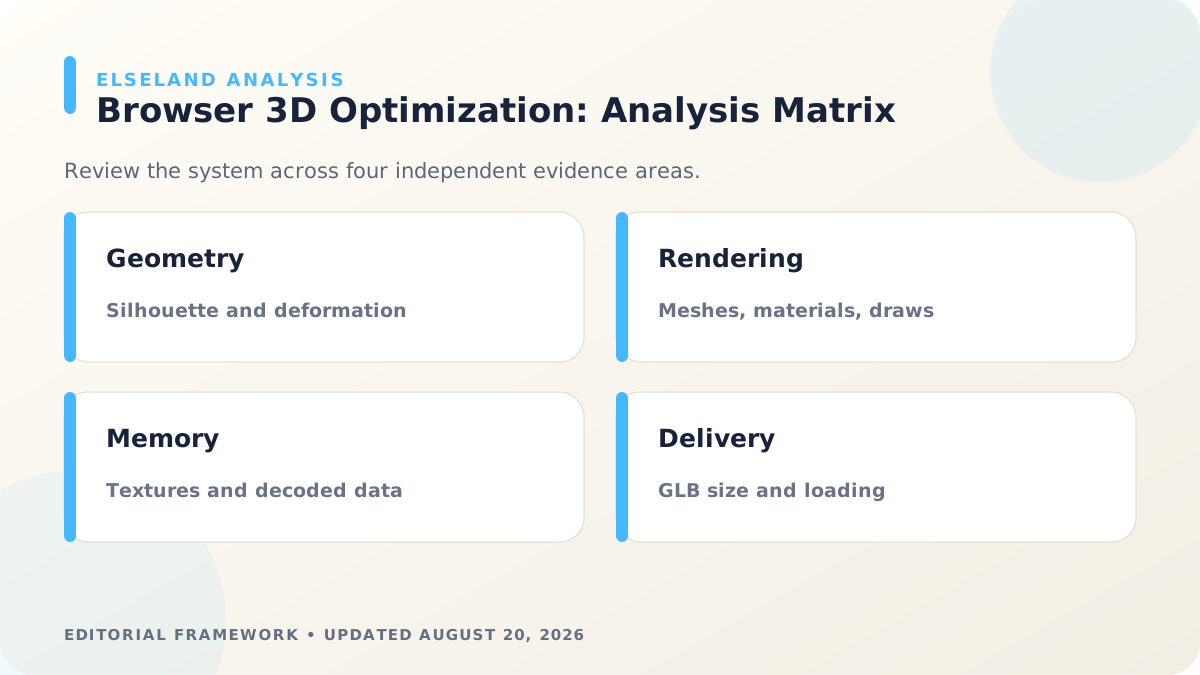
Write a small acceptance sheet before touching the mesh. Use ranges only as project-specific guardrails, then refine them after profiling. This keeps the team from treating an arbitrary triangle count as a universal definition of quality.
| Budget area | Question to answer | Evidence to record |
|---|---|---|
| Visual role | How close can the camera get, and what must remain readable? | Reference screenshots at near, typical, and far distances |
| Scene density | How many copies or similar assets appear at once? | A representative worst-case scene |
| Rendering | How many meshes and material passes does one instance add? | Draw calls and renderer statistics before and after |
| Memory | How large are the decoded textures and geometry on the target device? | Texture dimensions, formats, and device memory observations |
| Delivery | What must download before the player can interact? | GLB size, texture payload, and loading trace |
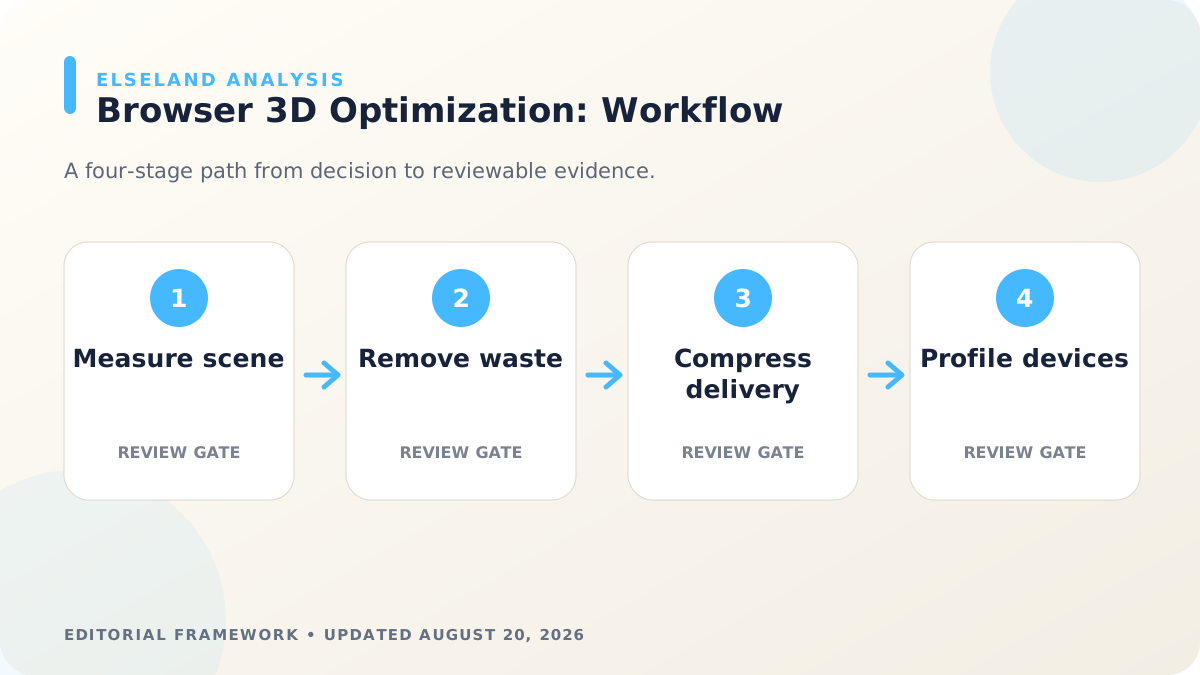
Measure the Original Model in a Real Scene
Do not optimize from the modeling viewport alone. Import the untouched asset into the same renderer, lighting setup, camera range, and object density the game uses. A model that performs well by itself may still push a crowded scene over budget. Verify the implementation detail against the current Three.js WebGLRenderer documentation before locking the production rule.
Record a baseline: file size, mesh and primitive count, material count, texture count and dimensions, animation clips, and visible rendering statistics. Three.js exposes draw calls, triangles, points, lines, geometries, and textures through renderer information; those values are useful for comparing revisions even when they do not explain every device-level cost.
Capture two or three screenshots alongside the numbers. Performance measurements tell you what changed, while paired images reveal whether the change damaged the silhouette, shading, UV seams, or recognizable features.
- Test one copy and the expected maximum number of visible copies.
- Include animation, transparency, shadows, and post-processing used in production.
- Use at least one lower-power target device instead of relying only on a development laptop.
- Keep the baseline GLB so later regressions can be reproduced.
Clean Geometry and Scene Hierarchy First
Generated models often contain the same kind of structural waste as hastily assembled manual assets: loose pieces hidden inside the model, duplicate surfaces, tiny disconnected components, empty nodes, unapplied transforms, and topology far denser than the shape requires. Remove that waste before decimation so the simplifier has a cleaner problem to solve.
Protect the features that carry identity. For a building, those may be the roofline, doorway, and window rhythm. For a creature, they may be the head profile, hands, or accessory shapes. Areas that stay flat on screen can usually lose more geometry than a contour that crosses the sky.
If the asset animates, validate deformation after every major reduction. A mesh can look unchanged in a bind pose and still collapse at shoulders, knees, fingers, or facial joints. Preserve extra support around joints and test the actual animation clips, not only a rotating preview.
Reduce Draw Calls Without Flattening the Art Direction
Browser scenes are often limited by how many separate pieces the renderer must submit, not merely by the number of triangles. Ten tiny meshes with ten materials can be a worse delivery asset than one carefully joined mesh with the same visible shape.
Merge static parts when they always move together, reuse identical geometry through instancing, and consolidate materials that share the same shading model. Remove material slots that no longer affect visible faces. These changes should follow scene behavior: do not merge a door into a building if gameplay must open it independently.
Material reduction is also an art decision. Combining every surface into one atlas may save submissions but make authoring, mip behavior, or future variants harder. Keep separate passes when they communicate a real rendering need, such as transparent glass or emissive signs, and remove separations that exist only because the generated file was fragmented.
Treat Textures as a Runtime Budget, Not Just Image Files
A compressed image can look small on disk and still occupy substantial GPU memory after decoding. Audit pixel dimensions, channel usage, alpha, color space, and how much screen area the texture actually covers. A background prop rarely benefits from the same resolution as a close-up character.
Resize textures to the highest useful detail level for the target camera. Pack compatible grayscale channels, remove unused maps, avoid alpha when the material is fully opaque, and reuse tileable materials where repetition is acceptable. For families of props, a shared atlas or material library can improve both consistency and batching.
KTX2/Basis texture delivery can reduce network and GPU costs when your pipeline and target browsers support it. Treat the conversion as a visual QA step: compare gradients, normal detail, transparent edges, and color shifts at gameplay distance before approving the result.
Compress the Delivery GLB After Visual QA
Once geometry, hierarchy, materials, and textures are intentional, apply delivery compression. Three.js GLTFLoader supports common glTF paths including Draco-compressed geometry, Meshopt-compressed meshes, and KTX2 textures when the corresponding decoders are configured.
Choose compression based on the full loading experience. A smaller download can require decoder code and CPU time, so compare time to first useful frame rather than celebrating file size alone. Mesh simplification and geometry compression solve different problems: simplification reduces what the GPU processes, while compression mainly reduces how those data travel and are stored.
glTF Transform provides inspect, validate, deduplicate, prune, simplify, resize, texture conversion, and compression commands. Its documentation also warns that a default optimize pass is not ideal for every scene, which is why production presets should be versioned and reviewed rather than applied blindly.
Validate on Target Browsers and Devices
Run a glTF validation pass, then load the delivery asset through the same production path used by the game. Check console warnings, missing textures, flipped normals, broken animation, color-space differences, transparent sorting, and disposal when the player leaves the scene.
Profile a representative level on each supported performance tier. Watch for a stable frame experience, but also inspect loading pauses, memory growth after repeated scene changes, and spikes when several models appear together. The correct result is the version that meets your project targets without obvious visual loss.
Finish with a replacement test: swap the asset for a new revision without changing gameplay code. Predictable node names, pivots, scale, material conventions, and collision proxies make future AI-generated variants much less expensive to integrate.
- Keep the editable high-detail source outside the shipped bundle.
- Version the export and optimization settings with the asset.
- Compare baseline and optimized screenshots at gameplay camera distances.
- Reject a smaller file if it causes visible artifacts or slower first interaction.
- Document the approved delivery model as the template for the next asset family.
What the Primary Sources Establish About Optimize AI 3D Models
Our evidence baseline starts with the Three.js GLTFLoader documentation, accessed August 20, 2026. We use it to establish documented behavior, terminology, or constraints—not to claim that the source endorses Elseland's workflow or conclusions. The practical artifact under review is a representative GLB loaded in the production renderer on target devices.
That distinction is central to E-E-A-T. A first-party page can establish what a format, tool, platform, model, or game team publicly documents. It cannot prove that a particular asset is fast, accessible, legally cleared, fun, or production-ready. Those conclusions require separate observation, measurement, specialist review, or player evidence tied to the actual project.
For this topic, the decision is whether the asset meets a scene-level frame, memory, and delivery budget without damaging silhouette or deformation. The following observations turn the official reference into a reviewable production record rather than a decorative citation:
| Evidence layer | What it can support | What it cannot support alone |
|---|---|---|
| Official source | Documented feature, rule, format, or published design context | Project-specific quality or universal performance |
| Project measurement | Observed behavior in a named build, scene, device, or sample | Unmeasured platforms or future versions |
| Human review | Usability, visual, editorial, and production judgment | Legal certainty or population-level player behavior |
| Release record | Who approved what, when, with which evidence | Permanent compliance after inputs or rules change |
- 1. record triangles, draw calls, materials, textures, and decoded texture memory before editing. Store the result with the asset or build identifier so another reviewer can reproduce the conclusion.
- 2. profile the asset alone and inside the busiest representative scene. Store the result with the asset or build identifier so another reviewer can reproduce the conclusion.
- 3. compare first-load transfer size with post-decode GPU and CPU cost. Store the result with the asset or build identifier so another reviewer can reproduce the conclusion.
- 4. capture close, medium, and distant views before accepting simplification. Store the result with the asset or build identifier so another reviewer can reproduce the conclusion.
A Field Review Protocol for Optimize AI 3D Models
Use this protocol after the first plausible output exists and before scaling the workflow. Keep one untouched baseline, one candidate revision, and one deliberately stressed case. The stressed case should expose the topic's likely failure mode—crowded scenes, extreme poses, small-screen play, unusual inputs, or a release-rule change—rather than merely repeat the easiest success case.
Run the review in the real delivery context whenever possible. Capture the tool or model version, source files, settings, target device or engine, date, and reviewer. If the work depends on a changing external service, record the response or exported artifact instead of assuming the same output can be recreated later.
A useful review ends with a decision and a next action. “Looks good” is not a gate. State whether the candidate passes, passes with a bounded exception, needs revision, or should be rejected; identify the evidence behind that status and the owner of the next check.
| Review status | Meaning | Required next action |
|---|---|---|
| Pass | All defined visual, technical, and release gates are supported by evidence | Freeze the reviewed artifact and link it to the build |
| Conditional pass | A known limitation is bounded and does not invalidate the intended use | Document the exception, owner, and trigger for re-review |
| Revise | The direction is viable but one or more gates remain unsupported | Change one controlled variable and repeat the affected checks |
| Reject | The candidate conflicts with the intended use, evidence, rights, safety, or budget | Preserve the record and choose a different approach |
- validate the original glTF and preserve a reversible copy. Record the expected result before the check, then attach the observed result and any exception after it.
- remove hidden geometry, empty nodes, and accidental duplicate materials. Record the expected result before the check, then attach the observed result and any exception after it.
- test geometry simplification against silhouette and animation stress poses. Record the expected result before the check, then attach the observed result and any exception after it.
- compress textures by channel purpose rather than with one global setting. Record the expected result before the check, then attach the observed result and any exception after it.
- measure renderer statistics and frame timing on a low-power device. Record the expected result before the check, then attach the observed result and any exception after it.
- repeat the same scene capture after every material, mesh, or compression change. Record the expected result before the check, then attach the observed result and any exception after it.
Expert Interpretation and Limits of This Game Assets & 3D Guide
The strongest conclusion this guide can support is a conditional production recommendation: use the workflow when its documented assumptions match the project, and keep the evidence needed to revisit the decision. We do not infer universal model quality, player preference, legal clearance, or performance from an official screenshot, a provider example, or a single successful asset.
Experience matters here because optimize ai 3d models crosses creative judgment and implementation detail. The practical review should include the people who will edit the source, integrate the result, test it in play, maintain it after release, and answer rights or policy questions. A narrow expert handoff often misses problems that appear only when those responsibilities meet.
Before publishing or shipping, repeat time-sensitive checks against the current source and exact build. Preserve dated evidence, disclose the evaluation method, and distinguish measured results from editorial inference. That record is more valuable than a confident conclusion that future reviewers cannot reproduce.
| Claim type | Editorial treatment |
|---|---|
| Documented fact | Link to Three.js GLTFLoader documentation and include the access date |
| Observed project result | Name the build, environment, sample, and method |
| Expert judgment | State the criteria, reviewer role, and tradeoff |
| Inference or forecast | Label it explicitly and describe what evidence could change it |
- A smaller GLB is not automatically a faster scene because decode, shader, and draw-call costs can rise.
- Desktop results do not establish mobile thermal behavior or low-memory stability.
- A static turntable cannot reveal skinning artifacts or animation-dependent bounds.
- One hero asset can pass while the accumulated scene still exceeds its budget.
Frequently asked questions
What is the best polygon count for a browser game model?
There is no universal number because cost depends on scene density, materials, animation, shadows, and target devices. Set a project budget from a representative scene and measure each asset against that context.
Does Draco compression improve frame rate?
Draco mainly reduces geometry transfer size and can improve download cost. It does not replace mesh simplification or reduce the number of draw calls after the model is decoded.
Should every AI-generated model be converted to GLB?
GLB is a convenient delivery container for browser runtimes that support glTF, but the choice still depends on your engine and pipeline. Keep the editable source format separately so the shipped file does not become the production master.
What should I optimize first: polygons or textures?
Measure both before choosing. In some scenes texture memory and material count dominate, while in others skinned geometry, shadows, or repeated meshes create the larger cost.
Can I merge every mesh into one object?
Only merge parts that share movement, visibility, and material needs. Doors, weapons, destructible pieces, and animated components often need to remain independent for gameplay.
How do I preserve the style of a generated 3D model?
Identify the silhouette, proportions, color blocks, and material cues that make the model recognizable before simplifying it. Compare revisions at the actual gameplay camera rather than judging only a close-up render.
Do compressed textures always look worse?
No, but every format and quality setting creates different tradeoffs. Review normals, gradients, transparency, and small high-contrast details on target devices before approving the conversion.
How should I test an optimized model?
Load it in a worst-case representative scene and compare delivery size, rendering statistics, memory behavior, and visual output with the baseline. Repeat the test on at least one lower-power device in your supported range.
Sources and further reading
- Three.js GLTFLoader documentation
Supported glTF extensions and decoder integrations, including Draco, Meshopt, and KTX2 paths.
- Three.js WebGLRenderer documentation
Renderer information fields for calls, triangles, points, lines, geometries, and textures.
- glTF Transform CLI documentation
Inspection, validation, pruning, simplification, texture processing, and compression commands for glTF assets.
Next step