Rapid prototyping is a search for evidence. Can a new player understand the goal? Does the core action create another meaningful decision? Is the browser the right delivery surface? AI can shorten implementation and asset exploration, but it cannot choose the right question for you.
The plan below starts from the same small-loop principle used in Elseland's 20-game AI-native workflow, then compresses it into a two-day prototype.
Quick read
Key takeaways
- Write one player-facing hypothesis and one repeatable loop before generating code or art.
- Use familiar controls, a narrow content set, and placeholder assets until the loop works.
- Build and play a production-shaped version during the first day.
- End with evidence and a go, revise, or stop decision—not a pile of unreviewed features.
Hours 0–4: Define the Test
Write the player fantasy, one core verb, goal, loss or completion condition, controls, supported viewport, and the evidence that would justify another week. Draw the loop as action, feedback, state change, next decision.
Choose one genre and remove secondary systems. A match-3 test may need one board and three goals; an action test may need one arena, one enemy, and one attack.
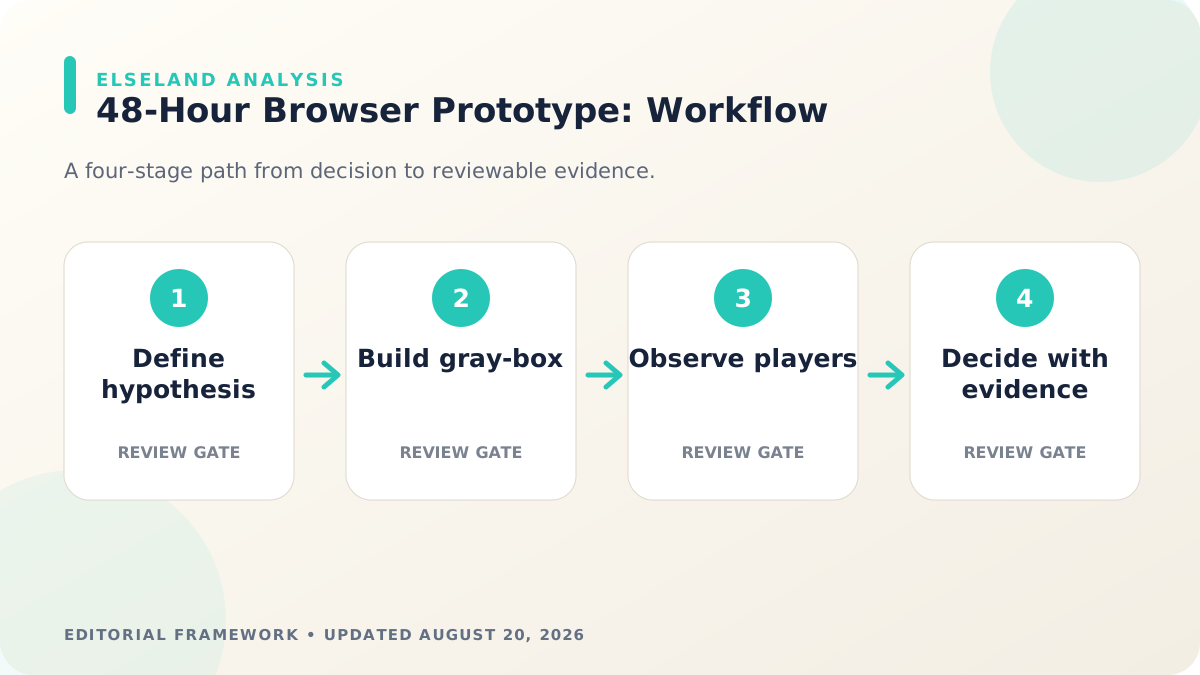
Hours 4–12: Build the Gray-Box Loop
Implement input, state, feedback, restart, and basic responsive layout with temporary shapes and text. Keep generated code in small reviewable modules and ask for tests or acceptance checks alongside implementation.
Run the game from the production build path before polishing. Development servers can hide route, asset, and export problems.
Hours 12–24: Make State Readable
Add only the assets needed to distinguish player, goal, hazard, reward, and interaction state. Use generated concepts as drafts and keep style constraints narrow.
Play the loop on desktop and a small viewport. Fix unclear input, invisible state changes, broken restart behavior, and large frame drops before adding content.
Hours 24–36: Test With Fresh Players
Ask players to begin without coaching. Record time to first intentional action, first confusion, first failure, restart behavior, and their explanation of the goal. Turn observations into specific fixes.
Do not spend this block defending the concept. The prototype exists to expose where the idea and interface disagree with the player.
Hours 36–48: Stabilize and Decide
Remove dead features, fix the first minute, check keyboard or touch input as applicable, validate metadata and public routes, then build again. Document known limitations and asset provenance.
When the loop is ready, compare it with games in the relevant Elseland category and decide whether to continue, revise the hypothesis, or archive the experiment.
A Concrete 48-Hour Prototype Schedule
Use six review blocks instead of treating the weekend as one continuous coding session. Hours 0–4 define the hypothesis and loop; 4–12 produce a gray-box; 12–20 establish production build and responsive input; 20–28 add only essential art and sound; 28–38 run fresh-player tests; 38–48 fix the first minute, document evidence, and decide.
At the end of each block, save a playable build and answer one question. If the gray-box is not understandable by hour twelve, do not compensate with more art. If the production build fails on mobile by hour twenty, reduce scope before content multiplies.
| Gate | Required evidence | Do not add yet |
|---|---|---|
| Hypothesis | One loop and one measurable question | Economy, lore, progression |
| Gray-box | Input, feedback, state, restart | Final art set |
| Production shape | Build, route, responsive viewport | More levels |
| Fresh-player test | Observed comprehension and failure | Developer explanation |
| Decision | Go, revise, or stop rationale | Unreviewed backlog |
Keep an Evidence Ledger
For every change, record the assumption, the smallest test, the observation, and the decision. Generated code and assets can make output volume look like progress, so the ledger keeps the team focused on uncertainty reduction.
Use screenshots, short recordings, console and performance traces, and direct player quotes or behaviors. A prototype is successful when it produces a decision—even when the decision is to stop or change direction.
- Assumption: what must be true for the concept to work
- Test: the smallest playable situation that exposes it
- Evidence: behavior, measurements, or reproducible defect
- Decision: keep, revise, remove, or investigate
- Owner and next gate: who acts and what will be reviewed
Recover When the 48-Hour Plan Slips
Scope slips most often because the loop contains hidden systems, generated code is accepted without integration review, or art begins before the camera and state are stable. Cut content before cutting feedback, restart, or basic accessibility.
MDN's browser-game material and Phaser documentation describe a mature platform, but framework choice cannot replace scope control. Prefer the tool the team can build, profile, and debug quickly over a fashionable stack introduced during the prototype.
| Symptom | Likely cause | Next check |
|---|---|---|
| Hour 12 and loop is unclear | Hypothesis or feedback is weak | Remove secondary systems and retest |
| Build works only in dev | Routes or assets depend on dev behavior | Fix production path before polish |
| Mobile controls fail | Desktop input assumed | Choose supported input and redesign UI |
| Generated code is brittle | Large unreviewed change | Shrink modules and add acceptance tests |
| Playtest yields opinions only | No focused question | Run task-based observation |
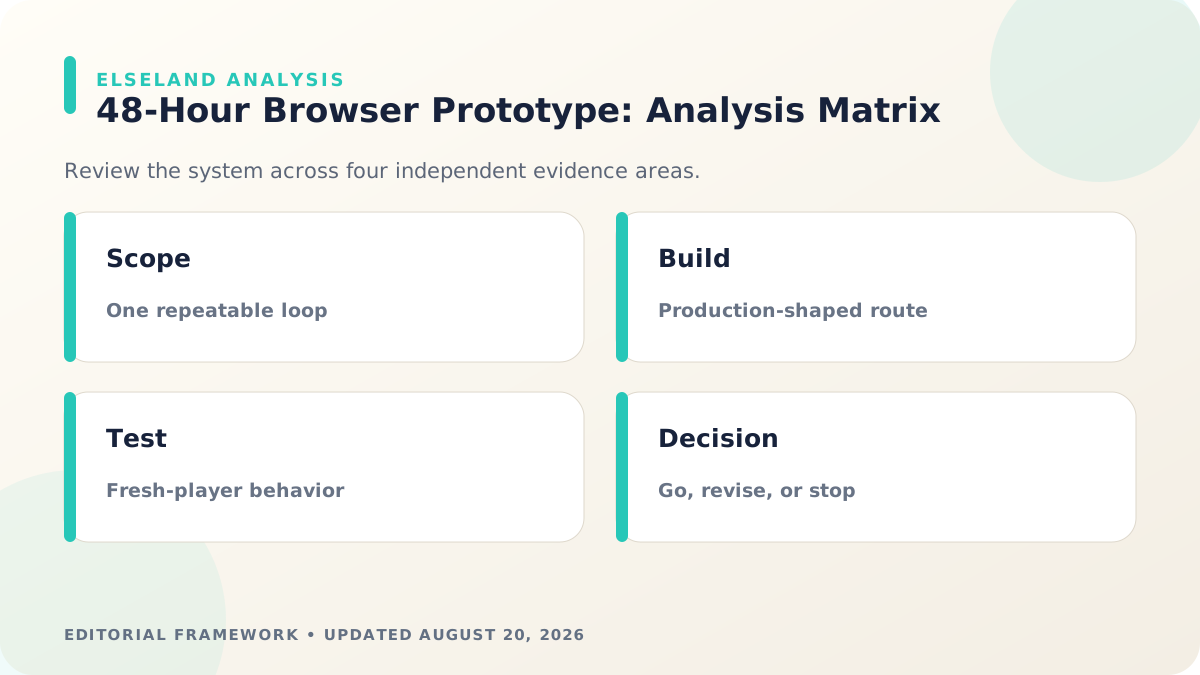
48-Hour Browser Prototype Definition of Done
A prototype does not need full content, monetization, account systems, or visual polish. It does need enough stability that a fresh player can produce trustworthy evidence without the developer operating the experience for them.
Archive the final build and ledger even if the idea stops. Reusable controls, state patterns, asset rules, and failed assumptions can shorten future prototypes when documented clearly.
- One player-facing hypothesis and repeatable loop are documented.
- Input, feedback, win or failure, and restart work without developer intervention.
- Production build and public route work at supported viewport sizes.
- Essential state is readable with placeholder or limited final assets.
- Fresh-player observations answer the chosen question.
- Known defects, asset provenance, measurements, and the next decision are recorded.
What the Primary Sources Establish About 48-Hour Browser Game Prototype
Our evidence baseline starts with the MDN game development, accessed August 20, 2026. We use it to establish documented behavior, terminology, or constraints—not to claim that the source endorses Elseland's workflow or conclusions. The practical artifact under review is a production-shaped browser route, one repeatable player loop, fresh-player observations, and a written go/revise/stop decision.
That distinction is central to E-E-A-T. A first-party page can establish what a format, tool, platform, model, or game team publicly documents. It cannot prove that a particular asset is fast, accessible, legally cleared, fun, or production-ready. Those conclusions require separate observation, measurement, specialist review, or player evidence tied to the actual project.
For this topic, the decision is whether the prototype answers its riskiest product question within forty-eight hours. The following observations turn the official reference into a reviewable production record rather than a decorative citation:
| Evidence layer | What it can support | What it cannot support alone |
|---|---|---|
| Official source | Documented feature, rule, format, or published design context | Project-specific quality or universal performance |
| Project measurement | Observed behavior in a named build, scene, device, or sample | Unmeasured platforms or future versions |
| Human review | Usability, visual, editorial, and production judgment | Legal certainty or population-level player behavior |
| Release record | Who approved what, when, with which evidence | Permanent compliance after inputs or rules change |
- 1. choose one uncertain player behavior rather than a broad game vision. Store the result with the asset or build identifier so another reviewer can reproduce the conclusion.
- 2. build the smallest loop that can produce observable evidence. Store the result with the asset or build identifier so another reviewer can reproduce the conclusion.
- 3. use real loading, input, viewport, and deployment constraints early. Store the result with the asset or build identifier so another reviewer can reproduce the conclusion.
- 4. separate implementation completion from hypothesis validation. Store the result with the asset or build identifier so another reviewer can reproduce the conclusion.
A Field Review Protocol for 48-Hour Browser Game Prototype
Use this protocol after the first plausible output exists and before scaling the workflow. Keep one untouched baseline, one candidate revision, and one deliberately stressed case. The stressed case should expose the topic's likely failure mode—crowded scenes, extreme poses, small-screen play, unusual inputs, or a release-rule change—rather than merely repeat the easiest success case.
Run the review in the real delivery context whenever possible. Capture the tool or model version, source files, settings, target device or engine, date, and reviewer. If the work depends on a changing external service, record the response or exported artifact instead of assuming the same output can be recreated later.
A useful review ends with a decision and a next action. “Looks good” is not a gate. State whether the candidate passes, passes with a bounded exception, needs revision, or should be rejected; identify the evidence behind that status and the owner of the next check.
| Review status | Meaning | Required next action |
|---|---|---|
| Pass | All defined visual, technical, and release gates are supported by evidence | Freeze the reviewed artifact and link it to the build |
| Conditional pass | A known limitation is bounded and does not invalidate the intended use | Document the exception, owner, and trigger for re-review |
| Revise | The direction is viable but one or more gates remain unsupported | Change one controlled variable and repeat the affected checks |
| Reject | The candidate conflicts with the intended use, evidence, rights, safety, or budget | Preserve the record and choose a different approach |
- write the hypothesis and a disconfirming observation. Record the expected result before the check, then attach the observed result and any exception after it.
- define the smallest complete start-action-feedback-result-retry loop. Record the expected result before the check, then attach the observed result and any exception after it.
- use placeholder content where fidelity does not affect the question. Record the expected result before the check, then attach the observed result and any exception after it.
- test keyboard, pointer, touch, resize, reload, and failure recovery. Record the expected result before the check, then attach the observed result and any exception after it.
- watch new players without coaching and record behavior. Record the expected result before the check, then attach the observed result and any exception after it.
- end with a decision and the evidence that supports it. Record the expected result before the check, then attach the observed result and any exception after it.
Expert Interpretation and Limits of This AI Game Creation Guide
The strongest conclusion this guide can support is a conditional production recommendation: use the workflow when its documented assumptions match the project, and keep the evidence needed to revisit the decision. We do not infer universal model quality, player preference, legal clearance, or performance from an official screenshot, a provider example, or a single successful asset.
Experience matters here because 48-hour browser game prototype crosses creative judgment and implementation detail. The practical review should include the people who will edit the source, integrate the result, test it in play, maintain it after release, and answer rights or policy questions. A narrow expert handoff often misses problems that appear only when those responsibilities meet.
Before publishing or shipping, repeat time-sensitive checks against the current source and exact build. Preserve dated evidence, disclose the evaluation method, and distinguish measured results from editorial inference. That record is more valuable than a confident conclusion that future reviewers cannot reproduce.
| Claim type | Editorial treatment |
|---|---|
| Documented fact | Link to MDN game development and include the access date |
| Observed project result | Name the build, environment, sample, and method |
| Expert judgment | State the criteria, reviewer role, and tradeoff |
| Inference or forecast | Label it explicitly and describe what evidence could change it |
- A forty-eight-hour prototype cannot validate retention, economy, or content scale.
- Polish can improve comprehension but may also mask a weak core loop.
- Friendly internal testers are not representative evidence by default.
- A technical demo is not a product test unless it exposes a player decision.
Frequently asked questions
Can AI build a browser game in 48 hours?
AI can accelerate a narrow prototype when scope, acceptance criteria, and human review are clear. A production-ready game usually needs more design, testing, content, rights review, and polish.
What should a 48-hour prototype include?
One understandable loop, input, readable feedback, a completion or failure state, restart, responsive layout, and enough instrumentation or observation to answer the chosen question.
Should I generate art before coding?
Use only enough reference art to define direction. Build the gray-box loop first so the prototype proves interaction before asset production expands.
How do I decide whether to continue?
Compare playtest evidence with the original hypothesis: comprehension, repeated engagement, technical feasibility, differentiation, and the cost of the next uncertainty.
What should be cut first in a 48-hour prototype?
Cut content volume, secondary modes, progression, narrative branches, optional settings, and bespoke polish before cutting the core loop, feedback, restart, or the evidence needed for the test. Preserve the question the prototype exists to answer.
Should a rapid prototype use a game engine or plain web APIs?
Use the stack the team can implement and debug fastest for the chosen loop. A familiar framework may provide input, scenes, audio, and asset loading; a small DOM or Canvas prototype may be simpler for a narrow interaction.
How many playtesters are needed for an early prototype?
A few fresh players can expose major comprehension and control failures, but the sample is not a market forecast. Use early sessions for qualitative diagnosis and design later tests for broader demand or retention questions.
What makes a prototype production-shaped?
It uses the real build path, route, viewport, input method, asset loading, and enough error handling to reveal deployment constraints. It can still use temporary art and a tiny content set.
Sources and further reading
- MDN game development
Mozilla's primary learning and platform reference for browser game development.
- Phaser getting started
Official overview of the Phaser HTML5 game framework.
- Git worktree documentation
Official reference for isolated working directories when parallel prototype changes need separation.
Next step